Start here.
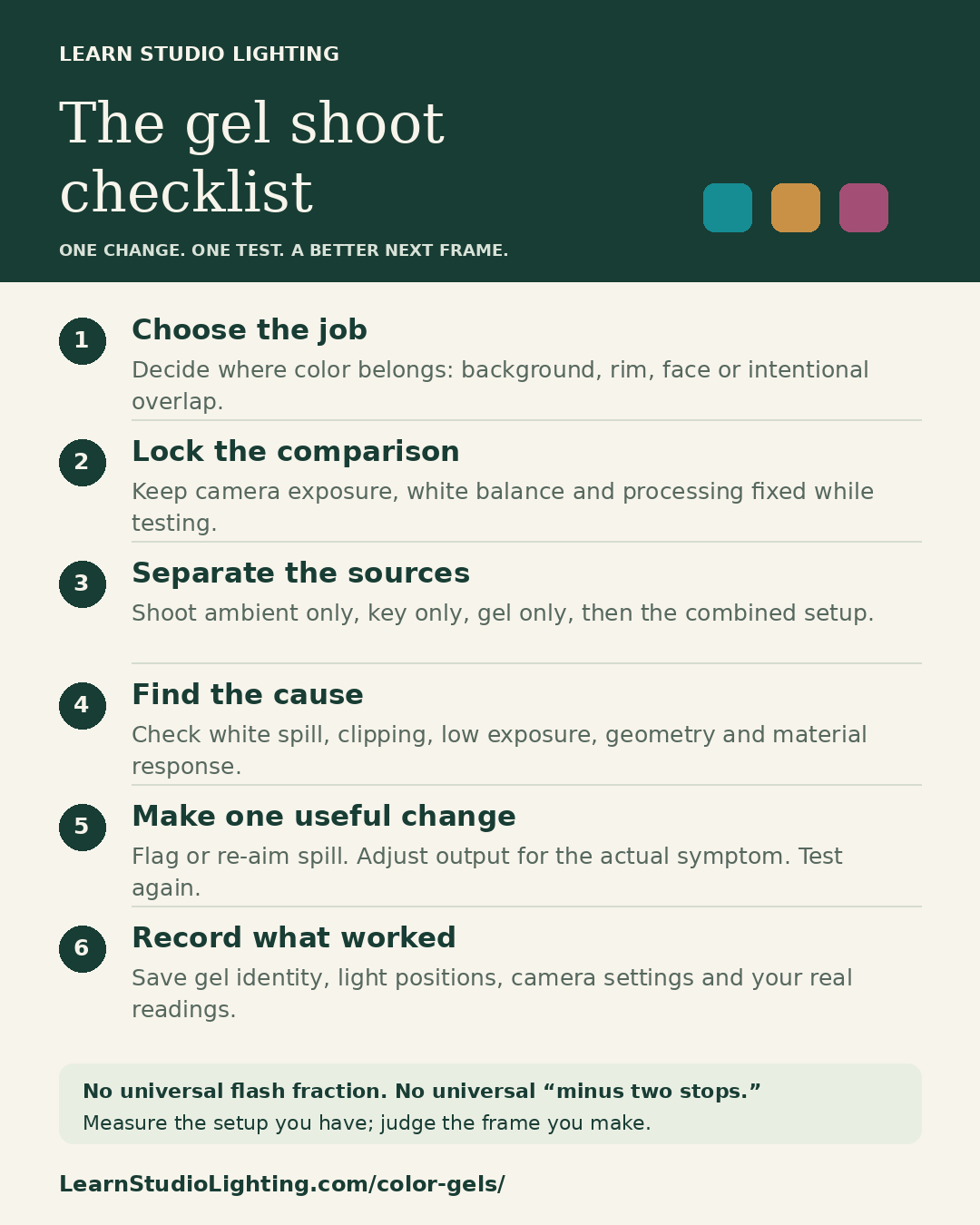
Lighting gels filter the light from a flash. Use correction gels to change a source toward a useful color balance, or effect gels to create a deliberate color. Start with one color and a clear job: background, rim or face. Lock white balance, test each light alone, control white spill, then check color and highlight detail with all lights on. There is no universal gel power setting.
Your three next steps
- Choose a color job and palette. Establish the face exposure and lock white balance before adding the gelled accent.
- Test each source alone. Fix placement, leaks and spill, then adjust output while checking the individual RGB channels.
- Photograph the complete setup and pose sequence. Save the gel, modifier, distances, settings and reference frames in your gel plan.
In this guide
- What lighting gels actually do
- Correction gels and creative gels solve different problems
- Separate hue, saturation and brightness
- Build a palette with a clear visual hierarchy
- Overlapping beams and stacked gels are different experiments
- Source color and camera white balance do different jobs
- Match mixed lighting—or deliberately let it differ
- Choose modifiers and mount gels safely
- Establish a repeatable camera and lighting baseline
- Keep natural skin while coloring the background
- White, gray and dark backgrounds each have a use
- Materials and wardrobe can change the apparent color
- One-light recipes: make a deliberate trade-off
- Two-light recipes: separate the jobs
- Three-light recipes: add a role, not just another color
- Place a colored rim before deciding its power
- Measure gel light loss separately from creative brightness
- Use a meter consistently—or build a camera test sequence
- Control ambient light without misusing the sync shortcut
- Troubleshoot the symptom in a useful order
- Translate a reference into observable choices
- Edit RAW files while protecting the captured color
- A practical checklist and a four-frame color challenge
- Frequently asked questions about flash gels
1. What lighting gels actually do
A lighting gel is a colored filter placed in a light’s beam. It changes the balance of wavelengths reaching the scene. A blue gel does not paint blue onto everything equally. The source, filter, surface and camera all influence the result. Think of the gel as one part of a color system.
Rosco’s filter guide explains the essential limitation: a filter removes or reduces light; it cannot supply wavelengths missing from the source. This matters with unusual LEDs and mixed fixtures. A filter that works beautifully on one flash may produce a different result on another light. Photograph the actual combination before relying on it.
Start by giving the color a job. A colored background can establish mood while preserving a neutral face. A rim can separate hair from the backdrop. A colored key can transform the whole portrait. Write that intention first. It will tell you which areas should receive color, and which areas need protection.
2. Correction gels and creative gels solve different problems
Correction gels move a source toward another lighting condition. Effect gels are chosen primarily for their visual color. The boundary is flexible: CTO can imitate warm evening light, and a strong effect gel can create an intentionally unnatural face. Decide whether your aim is a match or a visible difference.
LEE’s technical-filter descriptions distinguish orange, blue, straw and green corrections. CTO and CTB mainly change the warm/cool relationship. Green and magenta correction address a different color direction. CTS has a straw character that differs from orange correction. Product names describe families, so check the specific filter’s published behavior.
Full, half and quarter describe strengths within a manufacturer’s correction range. They are not flash power fractions. A half CTO does not mean half the flash output or a fixed number of lost stops. Measure the light loss separately. A correction gel also cannot repair every spectral gap in a poor-quality source.
| Gel family | Typical purpose | Practical check |
|---|---|---|
| CTO: color temperature orange | Warm a cooler source toward a warmer target | Choose strength for the actual source and target |
| CTB: color temperature blue | Cool a warmer source toward a cooler target | Check available output after filtering |
| CTS: color temperature straw | A straw-toned warming correction or effect | Compare its skin rendering with CTO |
| Plus green | Add green to match a green-biased environment | Correct the matched scene later if needed |
| Minus green | Reduce a green bias using magenta filtration | Check skin and a neutral reference |
| Effect colors | Create a deliberate colored background, edge or face | Test the actual surface and RGB highlights |
3. Separate hue, saturation and brightness
Hue is the color family: blue, red or green, for example. Saturation describes how colorful something looks compared with a neutral of similar brightness. Brightness describes how light or dark it appears. These are useful editing words, but lighting changes can affect all three together. Flash power is not a dedicated saturation control.
Imagine a blue background that looks pale. It might receive too much white spill. It might have a clipped blue channel. A light blue filter might simply be the wrong choice. Alternatively, the backdrop could be so dark that the color barely registers. Those situations require different fixes. Identify the cause before moving a slider.
Compare a gel-only frame with the complete setup. If the hue looks right alone, investigate the added lights. If it looks wrong alone, inspect the filter, mounting, surface, exposure and white balance. Keep a small sequence of tests. A comparison reveals more than trying to remember how the previous photograph looked.
4. Build a palette with a clear visual hierarchy
Choose one dominant color, then decide whether the second color should support or oppose it. Nearby hues can feel coherent: blue with cyan, or pink with lavender. Opposing hues create a stronger separation. A neutral face against a saturated background is already a color relationship. You do not always need two gelled lights.
Color wheels use different models. In an RGB light model, red and cyan, green and magenta, and blue and yellow are opposing pairs. Traditional RYB art wheels arrange some relationships differently. Treat palette names as composition aids. They do not guarantee that two real gels will combine into white on a person.
Include the wardrobe, skin, hair and location in the palette. A red jacket may dominate a restrained blue accent. A warm wooden floor can introduce another color through bounce. Limit the first experiment to two intentional color families. Then choose where the viewer should look first: usually the face, gesture or shape.
5. Overlapping beams and stacked gels are different experiments
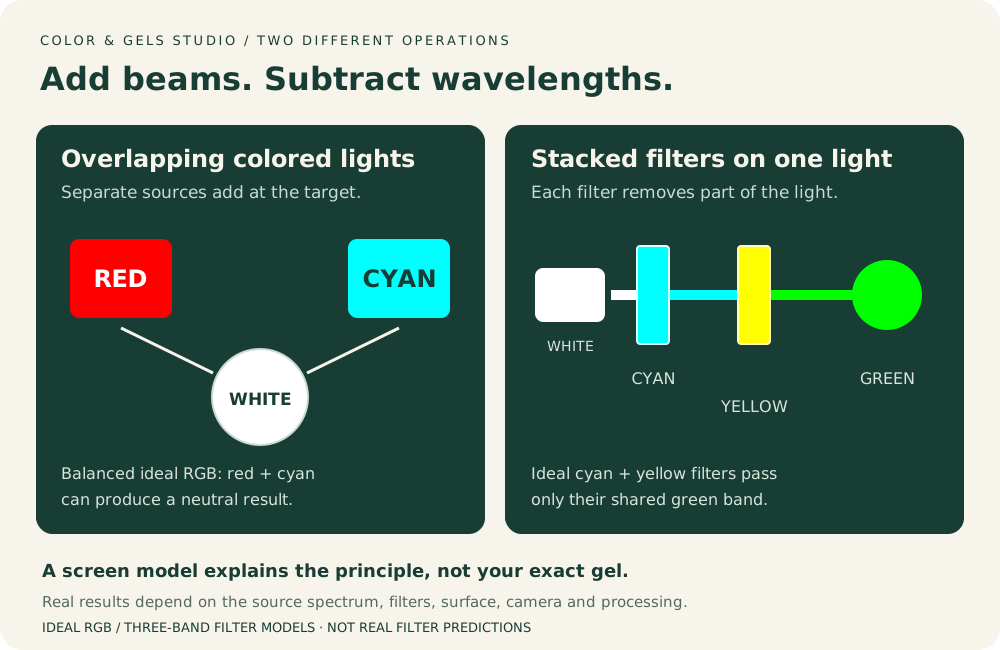
Two colored beams landing on the same surface add light. Their overlap can become brighter and change hue. Stacking two filters on one light filters that beam again. It generally removes more light. These are different processes, even when the gel names sound like a familiar paint-mixing recipe.
In an ideal model, red and green light can make yellow. Ideal cyan and yellow filters stacked on white light can leave green. Real gels have broad transmission curves. Real sources and surfaces are imperfect. Use these examples to understand the direction of the process, then photograph your own filters instead of expecting a guaranteed shade.
A screen preview is another model. Correct intensity calculations require linear-light values, as described in W3C’s color-conversion guidance. Simply averaging ordinary screen RGB numbers is not a physical lighting simulation. The Color Mixing Playground helps explore relationships; it cannot predict your exact filter spectrum, skin response or camera color.
6. Source color and camera white balance do different jobs
A source’s correlated color temperature describes its warm/cool appearance near the white-light locus. Camera white balance changes how the camera interprets the captured scene. Tint adjusts the green/magenta relationship. A saturated blue effect gel is not usefully described by one Kelvin number. Keep source correction and image interpretation separate in your notes.
For natural-looking skin, establish white balance under the key light before adding colored accents. Photograph a suitable neutral reference in the face position. Keep unwanted gel light off it for that reference frame. Lock white balance for comparisons. Auto white balance may react differently as you change framing or add a colored background.
Changing white balance changes the whole image. Rosco’s Alexis Cuarezma example uses a cooler camera setting with selected warm filtration to create contrast. That is a creative strategy, not a universal setting. If the face is already correct, changing global white balance just to fix the backdrop may damage the face. Change the backdrop light first.
7. Match mixed lighting—or deliberately let it differ
For correction, identify the dominant ambient source first. Is the face lit by warm practical lamps, daylight, or a green-biased fixture? Bring the flash closer to that source’s useful balance with the appropriate correction. Then establish white balance for the combined condition. LEE’s calculator starts with the source and target, rather than prescribing one gel for every room.
Mixed sources can differ beyond color temperature. Two lights with similar Kelvin labels may still render skin differently. Plus or minus green may help with a visible tint difference, but does not rebuild missing spectral content. If matching remains poor, reduce the unwanted source, move the subject, or replace it with a controllable light.
For contrast, decide which source should look neutral and which should look warm or cool. A warmer flash on the face with cooler surroundings can be intentional. Make an ambient-only frame, a flash-only frame where possible, and a combined frame. Those three references show whether the difference comes from the room, flash or their overlap.
8. Choose modifiers and mount gels safely
You can begin with a flash, a compatible holder and one gel. A grid narrows coverage; it does not guarantee that all spill disappears. A softbox changes apparent source size and coverage. A reflector can produce a concentrated patch. Choose the modifier for the area you need to illuminate, then add color.
Cover the intended emitting area so unfiltered light cannot escape around the gel. Use mounting accessories and materials approved for the fixture. Follow both light and filter manufacturers’ heat guidance. Keep filters clear of hot tubes, lamps and blocked ventilation. Do not assume a speedlight mounting method is suitable for a hot continuous fixture.
Rosco’s handling guidance notes that heat degrades filters and stacked filters reduce efficiency while increasing heat concerns. Inspect gels for fading, damage and uneven color. Replace compromised material. Test with the modeling lamp in the condition you will actually use. A mounting arrangement that looks fine during one flash is not automatically safe for a long session.
9. Establish a repeatable camera and lighting baseline
Set the camera manually while learning. Choose ISO and aperture for the image, then a supported ordinary sync speed. Use RAW when available. Keep the preview profile and screen brightness consistent. Make an ambient-only exposure before firing the flash. Decide whether the room light is part of the picture or an unwanted contribution.
Build the key first if the portrait needs a readable face. Set its shape and exposure without the colored accent. Save a key-only frame. Then turn the key off and position the gelled light. Judge where the color lands before adjusting how bright it is. This order prevents power changes from hiding a placement problem.
Turn both lights on and compare against the isolated frames. Check the face, hair, background and nearest shoulder. Let the flash recycle fully. Keep the pose steady during comparisons. Record a useful baseline before trying variations. You can return to a known frame instead of chasing a look through unrelated adjustments.
10. Keep natural skin while coloring the background
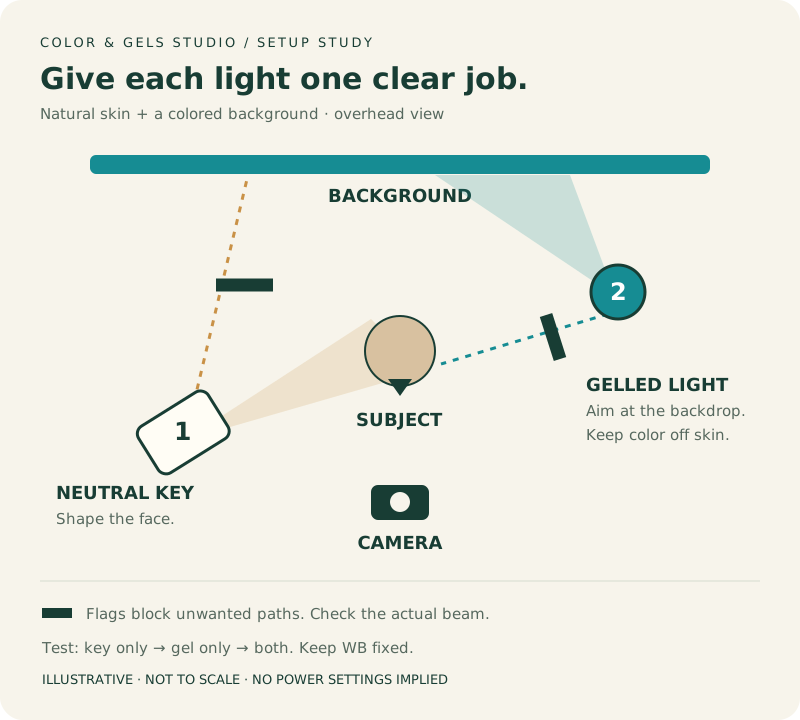
Use one neutral key for the person and a gelled light aimed at the backdrop. Create enough separation to control their paths independently. There is no universal distance: room size, modifier, framing and beam spread matter. Watch the backdrop in the key-only frame. If it is already bright, that white light may dilute the gel color.
Feather the key across the subject, add a grid if appropriate, or use a flag to block the unwanted path. Aim the gelled light so it covers the intended background area without striking the face. Rosco’s Jaqlin Medlock example illustrates the importance of controlling neutral spill when making colored backgrounds. Simply adding a denser gel is not the whole solution.
Compare key only, background only and both together. If skin changes when the background light joins, look for direct spill or reflected color. Move the subject, flag the path or change the backdrop’s illumination. Preserve enough coverage for real poses. A narrow clean zone is less useful if the subject leaves it whenever they turn.
11. White, gray and dark backgrounds each have a use
White paper can take colored light. It also reflects neutral spill efficiently, so controlling the key becomes important. Gray can offer a useful balance between brightness and spill sensitivity. A dark background may need more colored illumination to register, depending on its material. None is automatically correct for every palette.
Try a small comparison using the actual paper, fabric or wall. Keep the source, filter and camera treatment consistent. Photograph each surface with the gel alone, then with the key added. Compare color, smoothness and available output. Do not conclude that a backdrop is unusable from a test overwhelmed by unrelated room light.
Distance and aim can create a broad wash or a small pool. Moving the light changes coverage as well as brightness. Background wrinkles, texture and seams may become more obvious under angled light. A gradient can be attractive when intentional. Check the edges of the final crop, where uneven color is easiest to overlook.
12. Materials and wardrobe can change the apparent color
A gel does not make every object the same hue. A saturated garment may reflect some parts of the incoming spectrum strongly and absorb others. Black matte fabric may show little color. White cloth may reveal it clearly. A glossy jacket can reflect a bright image of the source instead of behaving like a matte swatch.
Photograph the real wardrobe before committing to the final palette. Include jewelry, glasses, makeup and fabrics that will appear in the frame. Watch sheer material when backlit. A colored rim may make an ear glow or reveal an unexpected reflection. These effects depend on geometry and material, not only on a flash reading.
Separate texture from brightness in your review. A broad highlight can become distracting even before every channel clips. Change the angle, source size or coverage when one surface overwhelms the image. Avoid raising the whole light just to reveal one dark patch. Sometimes a selective edge tells the story more clearly.
13. One-light recipes: make a deliberate trade-off
For a single-color portrait, gel the key and use a simple neutral background. Choose a lighting pattern you already understand. Position it for the face, then evaluate the color. Expect the skin to become colored too. If neutral skin is essential, one fully gelled key cannot independently provide neutral light to the face.
For a one-light silhouette, aim the gelled flash at the backdrop and let the person block it. Keep front ambient low enough for the intended silhouette. Check the outline of the nose, hands and clothing. This is a background-light setup. Moving that same light behind the person toward the lens creates a different backlight problem.
For a colored edge with a readable face, use the flash as the gelled rim and let a window illuminate the front. It is one flash but two contributing sources. Record the window condition and shutter speed. As daylight changes, the balance can drift. Build the plan around the light you actually have.
14. Two-light recipes: separate the jobs
Recipe one is a neutral key plus a colored backdrop. It is a useful starting point for learning saturation and spill without changing the face. Establish the key, isolate the backdrop light, then combine them. Adjust the backdrop’s coverage before its output. Check that the subject stays neutral across the planned poses.
Recipe two is a neutral key plus an amber or cool rim. Place the rim behind and to the side. Let it touch a chosen edge rather than bathing the whole face. Keep the light out of the lens. This arrangement can add color without demanding a large background area or an additional backdrop light.
Recipe three uses two colored sources on the face. Start with each light alone and decide where its color should end. Then inspect their overlap. Equal power settings do not make equal-looking halves. Pose, surface reflection, distance and filter transmission differ. A slightly dominant side often gives the image a clearer structure.
15. Three-light recipes: add a role, not just another color
A neutral key, colored backdrop and restrained rim create three separate controls. Build them in that order. Decide whether the rim repeats the background color, introduces a warm/cool contrast, or remains neutral. Use the third light only if it improves separation or storytelling. More colors can make the face harder to read.
Another option is a neutral key with two colored edges. Give each edge a defined area. Test the left and right rim independently before adding the key. They may overlap on hair, ears or shoulders. Watch the combined highlights. A clean individual test does not prove that two sources together retain enough texture.
Make three variations from the same baseline: background stronger, rim weaker, or one accent removed. Change only one choice per variation. Review the small thumbnails before zooming in. If the simplest version communicates best, keep it. Save the stronger alternatives as options instead of assuming the most elaborate setup is the finished one.
16. Place a colored rim before deciding its power
Begin behind and to one side of the person. Aim toward the hair, far cheek contour or shoulder you want to separate. Make a rim-only frame from the actual camera position. Check the front cheek and nose. An unwanted colored band there is usually a placement or coverage problem before it is a power problem.
Move the source farther behind, feather its beam or add a flag to remove unwanted face spill. A broad modifier can still reach around the face even when its stand is behind the subject. Recheck after a head turn. The useful edge is determined by the visible result, not a memorized stand position.
If the frame becomes hazy, inspect the source-to-lens path. A flag can hide the emitting surface from the lens while leaving the path to the subject open. Watch the whole crop for stands and cutters. Lower output may reduce the haze, but it does not directly remove the unwanted light path.
17. Measure gel light loss separately from creative brightness
Filtering reduces transmitted light by an amount that depends on the actual gel and source. There is no universal one-stop correction for gels. Keep ISO, distance, modifier, aim and meter method fixed when comparing before and after. Add the gel securely, allow full recycling, and repeat the reading at the same position.
Here is a hypothetical example using rounded whole-stop marks. The unfiltered source meters f/8. The same setup with the gel meters f/5.6. That is approximately one stop less arriving light under that measurement method. Increasing manual flash output by one stop means roughly doubling it. Re-meter to see whether it returns near f/8.
Restoring the original reading is not always the creative goal. You might prefer a darker, richer background or a subtler rim. A saturated filter also changes the spectrum, so the meter cannot guarantee identical camera response or safe RGB highlights. Use the reading to guide a repeatable adjustment, then judge the photograph.
| Hypothetical test | Reading | What it tells you |
|---|---|---|
| No gel; fixed setup | f/8 | Baseline arriving-light reference |
| Gel added; output unchanged | f/5.6 | About one stop lower by the same method |
| Same gel; output increased one stop | Re-measure | Expect near f/8; verify rather than assume |
| Complete portrait photographed | Inspect image | Choose the intended color, brightness and texture |
18. Use a meter consistently—or build a camera test sequence
For an isolated source comparison, follow your meter’s prescribed source-measurement method. Depending on the meter, that may use a retracted dome or suitable flat receptor facing the light. Turn other sources off. Measure at the relevant subject or background position. Record the receptor, direction and position so the next reading means the same thing.
An overall exposure check with an extended dome facing the camera is a different measurement. Follow the meter manual for that check with the intended sources on. A rear light can make a bright visible edge while contributing little to a camera-facing reading. Do not substitute one method for the other when reporting ratios or filtration loss.
Without a meter, keep the camera, pose and light geometry fixed. Photograph a small output bracket in known increments. Compare the RGB channels, texture and color under consistent viewing conditions. Record the output change honestly. “Raised flash one stop” is useful; “measured one stop over” requires an actual measurement. Save the selected frame as your visual baseline.
19. Control ambient light without misusing the sync shortcut
Under ordinary flash sync, shutter speed mainly changes ambient exposure when the entire flash pulse fits within the exposure. Aperture and ISO affect both ambient and flash capture. This makes the ambient-only baseline valuable. You can decide how much room color to retain, then adjust the flash contribution independently through its output.
That shortcut does not carry unchanged into high-speed sync. HSS changes how the flash illuminates the exposure, and usable output changes with the system and shutter setting. Very fast global-shutter exposures can also capture only part of a pulse. Test the complete camera and flash combination instead of assuming the same behavior.
Indoors, practical lamps may add a warm patch to one side of the face or background. Outdoors, daylight can dilute a gelled effect. Decide whether to reduce ambient, seek shade, move closer, or accept the blend. Raising flash output is one option, but it also affects recycling, available coverage and the look of the scene.
20. Troubleshoot the symptom in a useful order
Start with the simplest separating test: gelled light alone, other lights alone, then all together. Keep white balance and editing fixed. That sequence tells you whether the problem belongs to the colored source, another source, or their interaction. Change one cause at a time and keep the comparison frames.
Do not treat saturation as a reason to always lower power. A clipped blue highlight, a gray background flooded by white spill, and an underlit blue surface can all look disappointing. Their solutions differ. If the first test does not explain the symptom, check material response, camera processing and mounting before buying another filter.
| Symptom | First test | Next adjustment |
|---|---|---|
| Color looks pale | Compare gel-only and all-lights frames | Remove white spill; then check RGB clipping |
| Color is almost invisible | Check aim and gel-only exposure | Increase useful coverage or output if underlit |
| Skin shifts when accent is added | Compare key-only with combined frame | Flag direct spill; inspect reflected color |
| Hue differs from the plan | Lock WB; inspect actual filter and surface | Compare gel strengths and a neutral test surface |
| A colored edge turns white | Inspect local texture and each RGB channel | Reduce exposure or redirect the hot reflection |
| Background has an unwanted patch | Photograph each source separately | Adjust aim, coverage, flags or surface position |
| Blacks become hazy | Block the accent’s path to the lens | Flag or feather; check reflective room surfaces |
| Color varies between frames | Check recycle, TTL, pose and auto WB | Lock variables; repeat after full recharge |
21. Translate a reference into observable choices
Describe what you can see: a teal background, a warm narrow edge, natural skin and dark shadows. Then map each result to a likely lighting job. A finished image does not reveal the exact gel, flash fraction, meter reading or distance. Several setups and edits can produce similar appearances. Treat your reconstruction as a testable plan.
Sample comparable regions when using the Light & Tone Mapper. Choose a textured cheek, a background area and a meaningful accent. Avoid comparing a tiny specular point with a matte patch. Recorded pixel values belong to a rendered image. They are appearance targets, not incident readings or direct instructions to add a fixed number of flash stops.
Make a first approximation, then compare the largest differences: color placement, face brightness, background coverage and edge width. Solve those before chasing a precise swatch. A small hue adjustment cannot rescue the wrong lighting geometry. Keep a note of what is inferred and what you have measured in your own setup.
22. Edit RAW files while protecting the captured color
Choose a consistent RAW profile and set the intended white balance before fine color work. Compare against the key-only neutral reference if natural skin is the goal. Then check the combined image. Do not neutralize a deliberately colored area just because a picker says it is not gray. Judge it against the plan.
Inspect individual RGB channels as well as overall brightness. Adobe’s histogram documentation explains channel views; these help reveal problems a combined display can obscure. Camera histograms commonly describe a processed preview. White balance and picture style influence that preview. Check the RAW rendering when highlight detail matters, especially in small saturated areas.
Use local adjustments to refine captured separation, not to disguise avoidable spill everywhere. Truly clipped data cannot be recreated simply by lowering exposure. Preserve texture and avoid color halos around hair. Export in the color space required by the destination, usually sRGB for ordinary web sharing. Reopen the exported image and inspect the final crop and color.
23. A practical checklist and a four-frame color challenge
Before the first frame, confirm the color job, palette and intended skin treatment. Secure the approved gel mount. Lock the camera and white balance. Photograph ambient only and key only. Check the backdrop for unwanted white light. Then add the gelled source and inspect placement, local highlights and the complete pose range.
Make a four-frame challenge: ambient only, gelled light only, neutral key only, and both lights together. Keep exposure, white balance, framing and processing fixed. Compare the contributions, change one variable, then repeat. With one flash, compare ambient only, gel only and one changed-variable repeat. Label what changed.
Save the camera settings, flash model, gel name and strength, modifier, approximate distances and output. Add the meter method if used. Include a setup photograph and one minimally processed reference. Note the final edit separately. Your future self should be able to identify both the physical lighting choices and the finishing decisions.
Request a private Gel Shoot Review with your goal, setup and a specific question. For a community lighting breakdown, share a contact sheet alongside the finished portrait and explain the most useful adjustment. Use your own images and respect your subject’s sharing preferences. A clear comparison gives other photographers something practical to try.
24. Frequently asked questions about flash gels
Which gel should I try first? Choose one color with one job, such as a cool background behind a neutral face. If matching warm room light is your actual need, begin with the appropriate correction family instead. The best first filter is the one that answers your current lighting problem.
Can I use gels with speedlights, studio flash or LEDs? Often yes, with a filter and mounting method approved for that fixture. Output, spectrum and heat conditions differ. An RGB LED can create color without a physical gel, but it still needs the same placement, exposure and camera checks.
Why does the gel look different from its swatch? You are seeing the interaction of source spectrum, filter transmission, surface reflection and image processing. The swatch is a selection aid. Judge a photograph of the real subject under the actual light. Keep that reference with the filter’s label.
Can I fix everything with white balance or saturation? No. Global white balance changes all sources together. Saturation cannot restore missing texture, remove a physical reflection or recover genuinely clipped data. Use editing to finish a sound capture. Fix the light path when color lands in the wrong place.
Do I need exact Kelvin values and a fixed rim-to-key ratio? You need a repeatable record of your chosen settings and measurement method. No single number guarantees natural skin or vivid gels. Begin with a clear intent, make isolated tests, and let the complete photograph decide the final balance.
Remember this
Give every color a job. Separate source correction from camera white balance, control spill before chasing saturation, and verify highlights in the photograph. Save a clear setup and test sequence so the look is repeatable.
Turn the color idea into your next portrait.
Choose your palette, assign each light a job, and save a practical plan. Bring a specific question and your setup to Gel Shoot Review when you want feedback.
Build my gel lighting plan →Sources & further reading
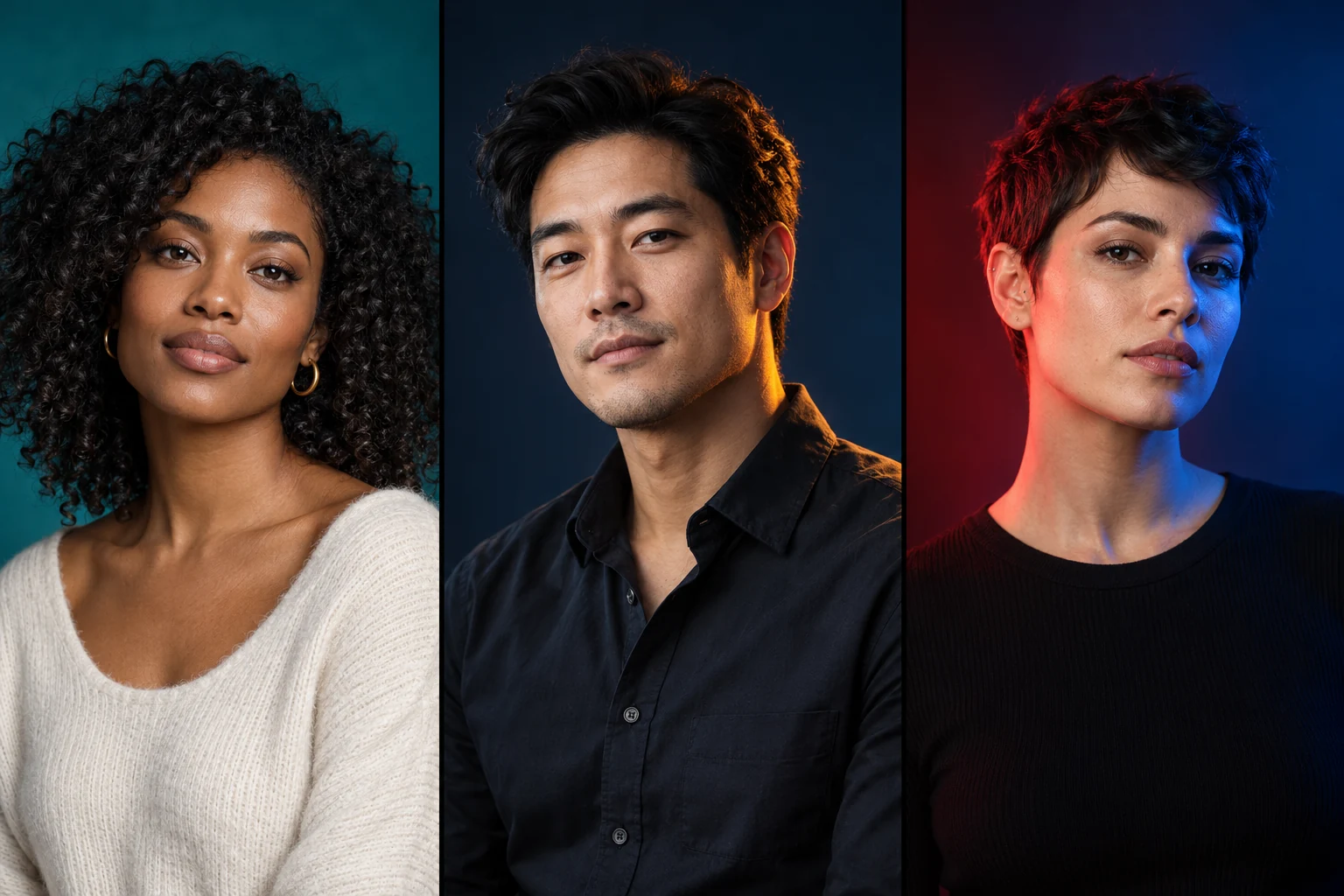
Source guidance checked on October 22, 2026. Recipes, diagrams, troubleshooting steps and the checklist are original teaching material. The hero portraits are AI-generated illustrations, not measured studio tests. Physical filters, surfaces and cameras vary; test the actual combination.
- Rosco Guide to Color Filters: transmission and color mixing ↗
- LEE Technical Filters: correction families ↗
- LEE Colour Temperature Calculator: source and target ↗
- Rosco and Jaqlin Medlock: colored backgrounds and spill ↗
- Rosco and Alexis Cuarezma: white balance and warm/cool contrast ↗
- Rosco filter handling: heat and doubled filters ↗
- W3C CSS Color 4: linear-light color calculations ↗
- Adobe: using the Histogram panel ↗
Published by DNA Premium Portraits with AI assistance. This lesson is educational; a suggested setting is not a tested result for your exact setup.
One palette. Three frames. A clearer answer.
Pass along the guide, then compare your light placement and results.