Start here.
Place a rim light behind and to one side of your subject. Aim for the hair, far cheek contour or shoulder, then check a rim-only frame from the camera position. Keep unwanted light off the front of the face and nose. Start gently, raise power in small steps, and protect the detail you want to keep. There is no universal rule that a rim must be one or two stops brighter than the key.
Your three next steps
- Lock the pose and camera settings. Place one rim behind the subject; make a rim-only test and check the nose, shoulder and lens flare.
- Use the metering method below consistently. Try a modest starting level, then adjust in 1/3-stop steps while watching texture and RGB clipping.
- Add the key light and check the whole portrait. Save the angle, distance, modifier, gel, meter method and final power in your lighting plan.
In this guide
- What rim light does—and when you need it
- Where to place a rim light
- Keep the rim off the nose and front of the face
- Height, distance and the width of the edge
- Choose a modifier for the job
- Prevent flare without losing the rim
- How bright should a rim light be?
- Meter it consistently: source output vs camera exposure
- Stops over and under: the f/8 reference chart
- Flash power fractions are not exposure readings
- Build a complete portrait one light at a time
- Can you do this without a light meter?
- Use gels with a clear color plan
- Why does a colored rim look pale or disappear?
- Adapt the rim to hair, skin and wardrobe
- One rim, two rims and different backgrounds
- Rim lighting outdoors and in mixed light
- Speedlights, LEDs, TTL and groups
- Glasses, products and other tricky subjects
- Troubleshooting: change the cause first
- Match a reference and plan the retouch
- Use the existing tools as one workflow
- A practical exercise to share with your photo group
- Quick answers to the remaining common questions
1. What rim light does—and when you need it
Rim light is light that catches the visible edge of a subject. It can separate dark hair from a dark backdrop, reveal the line of a shoulder, or give a portrait energy. The bright edge may be narrow or broad. It does not have to surround the whole person.
The names overlap. An edge light or kicker usually comes from behind and to the side. A hair light often sits higher and lights the top or back of the hair. Backlight describes the general direction; not every backlight produces a visible rim. A background light lights the backdrop itself. Decide which job you need before adding another stand.
Use a rim when it strengthens the subject or the story. Skip it when the existing contrast already gives enough separation. A natural portrait may need only a faint lift in the hair. An athlete or performer may suit a stronger edge. A bright outline around every person is a style choice, not a requirement for professional lighting.
2. Where to place a rim light
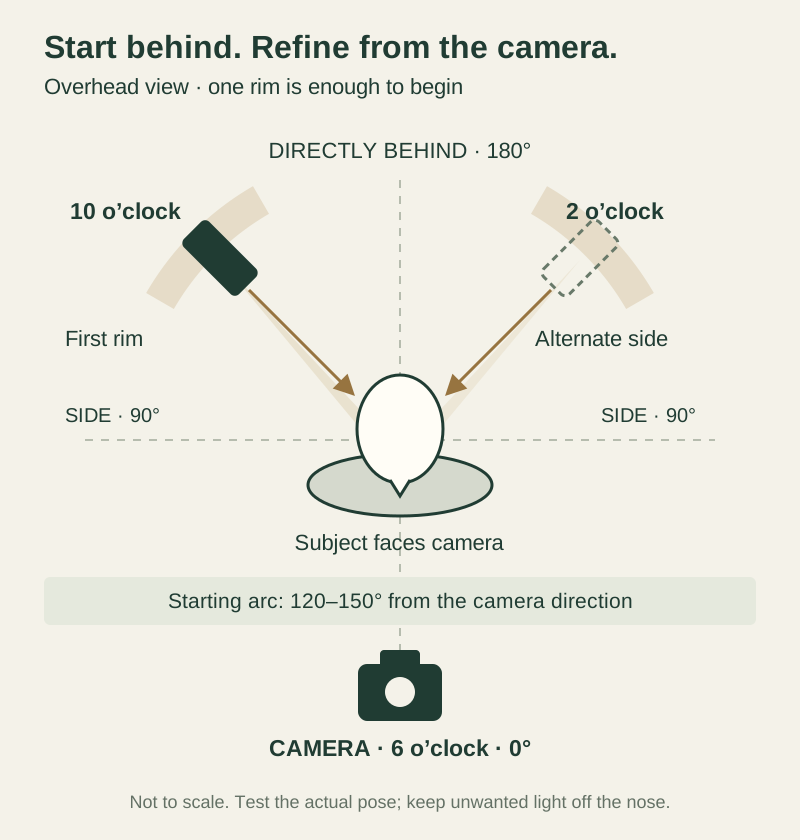
Look down on the setup from above. Put the subject in the center and the camera at 6 o’clock. Begin with one rim near 10 or 2 o’clock. In angle terms, call the subject-to-camera direction 0°, the side 90°, and directly behind 180°. About 120–150° from the camera direction is a useful starting arc on either side.
Aim the light toward the back-side edge you want to show. Keep the stand outside the frame. Start with one light so you can see its effect clearly. The diagram is a starting layout, not an exact recipe: head shape, pose, modifier size and camera position change where the edge appears.
Move the light a little at a time while watching from the lens position. Closer to the side often makes the lit area broader. Moving farther behind can narrow it, hide it behind the body, or send more light toward the lens. Do not assume that a light directly behind the head will make a useful rim on both sides.
3. Keep the rim off the nose and front of the face
For a clean separation light, the nose is a useful warning point. A bright patch on its front or tip may pull attention away from the eyes. Westcott’s edge-light lesson makes this same placement check for continuous lighting. The principle also helps when placing flash: judge where the beam lands from the camera’s view.
Turn the key and fill off. Take a rim-only photograph with the intended pose. Inspect the nose, front cheek, ear, jaw and shoulder. If the nose catches an unwanted secure checkout, move the rim farther behind in small steps, feather its aim, or change the head angle slightly. Feathering means using the edge of the beam instead of pointing its center at the subject.
If the source is broad, moving its center behind the subject may not be enough. The front edge of the softbox may still illuminate the face. Try a narrower modifier, a grid, or a flag that blocks only the unwanted path. Lowering power makes the spill dimmer; it does not correct its placement.
Recheck after every pose change. A head turn can bring the nose into a beam that was clean a moment earlier. A deliberately lit profile is a valid exception: the nose outline may be part of the picture. The goal is intentional shape, not a rule that the nose must always remain dark.
4. Height, distance and the width of the edge
For a head-and-shoulders portrait, start with the source a little above head height and aim down toward the far hair and shoulder. Too high may light only the crown. Too low can produce a bright ear, jaw or underside of the arm. Watch the actual illuminated areas rather than relying on the height of the stand.
A vertical stripbox can cover hair, shoulder and torso with one source. A small gridded reflector can isolate a smaller area. The visible rim width depends on source size as seen by the subject, position, beam control, and the subject’s shape. Power changes brightness; it is not the main control for rim width.
Close placement can give a strong change in brightness when the subject moves. More distance may make coverage steadier, but needs more output for a similar reading. Changing distance also changes apparent size and spill. Re-meter after moving the light; a nearby large softbox does not always follow a simple point-source distance estimate.
For full-length work, check the head, shoulder, waist and feet separately. For movement, rehearse the complete motion. Give the performer a marked working area and test its edges. A beautifully narrow rim on a still subject may miss them as soon as they lean or jump.
5. Choose a modifier for the job
A stripbox with a grid is a useful starting option, but you do not need to buy one to learn this. A speedlight can make a rim. The important questions are how much of the subject needs coverage, how broad the reflected highlight should be, and where unwanted light can travel.
A grid controls spread. It does not guarantee a dark background or remove every reflection. A large gridded source can still make a broad highlight. Elinchrom’s grid lessons and broncolor’s rim-light example show different ways to shape backlight; neither establishes one mandatory modifier or power setting.
| Modifier | Useful for | Watch for |
|---|---|---|
| Vertical stripbox + grid | Controlled coverage along hair and body | A broad bright band if too far to the side |
| Reflector + grid or snoot | A small, crisp accent | Hot spots and a narrow movement zone |
| Bare speedlight | A compact, inexpensive rim | Uneven coverage; zoom and aim matter |
| Large softbox | A broader, gentler transition | Face spill, backdrop spill and flare |
| Flag or black cutter | Blocking a specific unwanted path | Keep the wanted edge lit and secure the stand |
6. Prevent flare without losing the rim
A light aimed back toward the camera can wash out blacks, reduce contrast, or create a bright ghost. The source does not have to appear inside the frame to cause flare. A pale veil across the image may be a lens problem rather than a low-contrast lighting ratio.
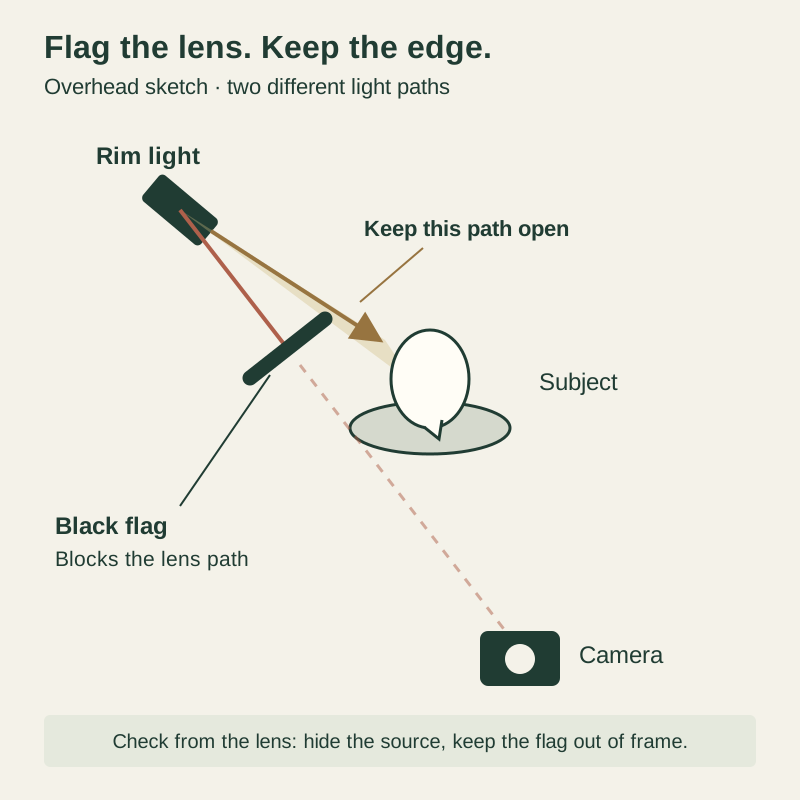
Place a black flag between the rim source and the lens. From the lens position, the flag should hide the bright emitting surface while leaving the light’s path to the subject open. The diagram shows those two separate paths. Check the full frame for the flag, stand and shadow. Recheck if you move the camera.
Use an appropriate lens hood, feather the source away from the lens, and try a grid if useful. Keep reflective walls or objects from bouncing light back into the scene. A flag fixes a path that power alone cannot fix. Secure stands and keep hot lights, gels and fabric separated as their manufacturers specify.
Flare can also be deliberate. Broncolor’s example embraces backlight shining toward the lens for a glowing effect. Make that a conscious choice. If the brief calls for rich blacks and a precise edge, compare a flagged frame with an unflagged one before accepting the haze.
7. How bright should a rim light be?
Bright enough to make the separation you want, while preserving the detail that matters. Start by judging the photograph at normal viewing size. Then zoom in to inspect the hair, skin and clothing. A dramatic edge can work, but it should not automatically become the first thing you see.
Do not confuse three different things: the power setting on the flash, an incident meter reading at the subject, and the brightness recorded by the camera. A shiny shoulder can reflect a bright streak at modest output. Dark matte fabric may need more light to show. An incident meter measures arriving light; it does not know which surface will reflect it into the lens.
For a restrained, un-gelled portrait rim, a cautious first experiment is an isolated source reading around one to two stops below the camera aperture. Use the defined method in the next section. This is an editorial starting bracket, not a standard or guaranteed result. Increase in 1/3-stop steps if the edge is too weak. Some setups need less; others need equal or greater readings.
A reading at the camera aperture, or one stop above it, may suit a stronger look after testing. Two stops above is a deliberate high-output option, not the default. Watch for a featureless white line, glowing ears, pale gels, and shoulders brighter than the face. Tiny specular points can be acceptable; lost texture across an important area is a different decision.
8. Meter it consistently: source output vs camera exposure
Set the meter to the camera’s ISO and the appropriate flash mode. For these examples, use ordinary flash sync with low ambient light. Place the meter at the part of the subject receiving the rim, not beside the flash. Keep that position fixed when comparing output changes.
For an isolated source comparison, use your meter’s prescribed lighting-ratio method. The Sekonic L-358 manual uses a retracted dome aimed at each source, with the other source off. A suitable flat receptor may serve this purpose on other meters. Follow your own manual and record the receptor and direction. The stop table below uses this isolated, source-facing convention.
For the overall portrait exposure check, the same Sekonic manual uses the extended dome toward the camera with the lights on. That is a different measurement. A rear light may contribute little to a camera-facing reading while still creating a bright visible edge. Do not swap these methods mid-test and treat the numbers as interchangeable.
After metering, make a photograph with all intended lights on. Check the rendered highlights and individual RGB channels. Meter readings guide a repeatable adjustment; the photograph decides whether it works. Strong gels and reflective surfaces make that final camera check especially important.
9. Stops over and under: the f/8 reference chart
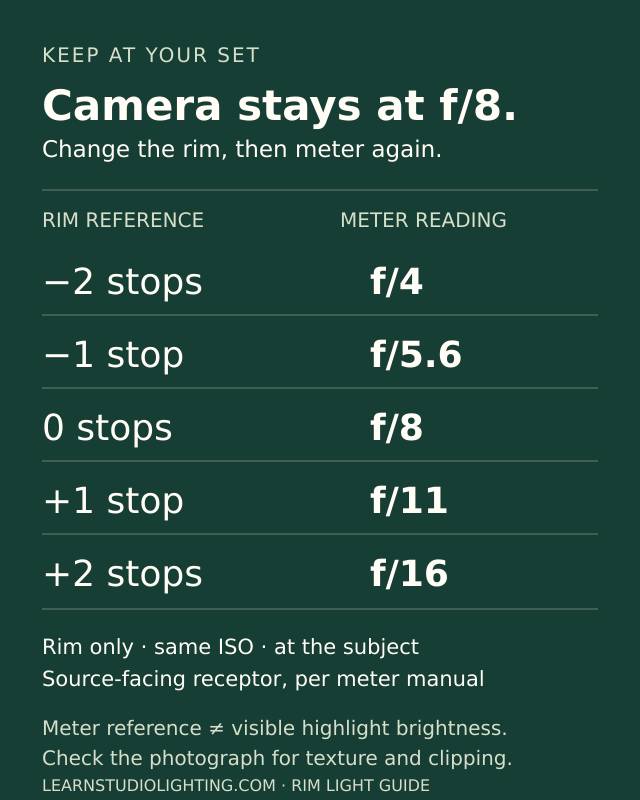
Keep the camera at f/8 throughout this example. Change only the rim’s output. Measure the rim alone, at the subject’s rim-lit area, using the source-facing receptor method above. ISO, meter direction, distance, modifier and aim stay fixed. The f-number in the middle column is the meter’s reading, not a request to change the lens.
A rim that meters f/11 is about one stop above an f/8 camera setting. It delivers about twice the light of the f/8 reading in that same meter setup. A rim that meters f/5.6 is about one stop below. This describes an exposure reference, not a promise that a cheek or strand of hair will look exactly one stop brighter or darker.
The numbers are the familiar rounded whole-stop marks. For other camera apertures, move through the same sequence: f/2.8, f/4, f/5.6, f/8, f/11, f/16, f/22. If you like the math, the reference difference is 2 × log₂(rim meter f-number ÷ camera f-number). Keep the measurement method attached to the result.
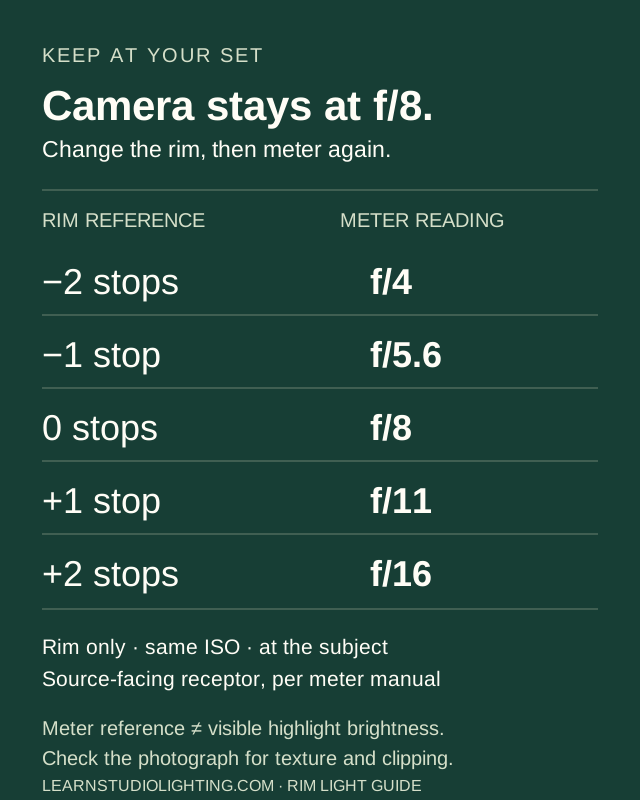
| Rim reference | Isolated meter reading | Light vs f/8 reference |
|---|---|---|
| −2 stops | f/4 | ¼ as much |
| −1 stop | f/5.6 | ½ as much |
| 0 stops | f/8 | Same reference |
| +1 stop | f/11 | 2× as much |
| +2 stops | f/16 | 4× as much |
10. Flash power fractions are not exposure readings
Suppose your rim at 1/32 power meters f/4 with the setup fixed. To aim for f/5.6, try 1/16 power: one stop more output. To aim for f/8, try 1/8 power: two stops more than the starting point. Re-meter after each change. Let the flash recharge fully.
That example does not mean 1/16 is the correct rim setting. Another flash, modifier, zoom position, gel, distance or ISO can give a different reading at the same fraction. A numeric power display also varies by brand; check whether a change of 1.0 means a whole stop on your unit.
Likewise, a rim at 1/8 and a key at 1/16 do not establish a two-to-one lighting ratio at the subject. The two beams may travel different distances through different modifiers. Measure each source consistently. Also distinguish a ratio between isolated sources from the final ratio between lit and shadow sides, where multiple sources can add together.
11. Build a complete portrait one light at a time
First, choose your framing, pose, ISO, aperture and a supported sync speed. Take an ambient-only frame. Decide whether room light should contribute or disappear. Then establish the key light and the face exposure. Save a key-only frame for comparison.
Next, turn the key off and add one rim. Begin behind the subject, check the nose and shoulder, and flag the lens if needed. Use a gentle starting output. Make small adjustments until the edge has the shape and detail you want. Fix shape with placement; fix level with output.
Turn the key back on. Check whether its spill washes out the rim or changes gel color. Add fill or a background light only if the picture needs it. Test each addition separately, then check the combined result. Two lights can overlap on the same shoulder even when each looked acceptable on its own.
Finally, shoot the real pose sequence. Check both directions of a head turn, the nearest shoulder, flyaway hair, glasses and reflective jewelry. Save the final settings with a setup photograph. A clean static test is only useful if the lighting holds up for the photographs you actually need.
12. Can you do this without a light meter?
Yes. Use manual camera settings and manual flash output for repeatability. Make a rim-only frame at low output. Raise or lower power in 1/3-stop steps while keeping the pose and geometry fixed. Compare frames on a consistent display, using highlight warnings and the RGB histogram as guides.
Do not judge only by the rear screen’s apparent brightness. Its brightness setting and your viewing conditions can mislead you. Camera histograms usually reflect a processed preview, so picture style and white balance influence the warning. Check the RAW file when highlight retention is critical. A normal overall histogram can hide a small clipped rim.
Without a meter, describe your adjustment honestly: “rim power increased one stop from the previous frame.” Do not claim “rim meters one stop over f/8.” You know the power change, but you have not made that measurement. Your saved test frames still give you a practical reference.
13. Use gels with a clear color plan
Begin with one gelled rim and a neutral key. A warm edge can suggest late sun; a cool edge can contrast with warm skin. Choose colors that support the wardrobe and background. Two opposing colors can be effective, but more colors do not automatically create a stronger portrait.
Lock white balance while comparing tests. If neutral skin is the goal, set it from the key-light condition using an appropriate neutral reference. Then add the colored rim. Changing white balance affects the whole image, including both lights. Rosco’s white-balance demonstration shows how a warm gel and a cooler camera setting can create a different warm/cool relationship.
Use a gel or holder approved for your light. Cover the emitting area so unfiltered white light does not leak around it. Follow the light and filter makers’ heat and mounting instructions. Keep gels clear of hot parts and ventilation. Add the gel before the final meter and camera checks.
Gels absorb different amounts and wavelengths of light. There is no single “add one stop for a gel” correction. Measure again if you use a meter, then judge the camera result. A meter’s overall exposure reading cannot guarantee the desired color or protect every sensor channel.
14. Why does a colored rim look pale or disappear?
First identify the cause. If the gelled edge is clipped or nearly white, reduce its output and inspect the RGB histogram. A red, blue or green channel can run out of room before an overall brightness warning looks severe. A pale edge can also come from un-gelled light leaking around the filter.
If white key light, fill or wall bounce overlaps the colored edge, it can dilute the visible color. Control that spill with aim, grids, flags or distance. A stronger gel cannot fully solve uncontrolled white light falling on the same area. Check the gelled rim alone, then add the key to see what changes.
If the edge is simply too dark, lowering output will not magically improve it. Raise it carefully, adjust the angle, or choose a less dense gel. Saturation is not a universal “less power equals more color” slider. The material matters too: colored fabric and hair can reflect a gel differently from a neutral surface.
Compare both color and detail after the final RAW profile, white balance and contrast choices. A vivid cyan rim should not require a featureless cyan shoulder. Use a small bracket and choose the frame that keeps the color, shape and texture your intended finish needs.
15. Adapt the rim to hair, skin and wardrobe
Dark hair against a dark backdrop may need a more visible edge, but shiny dark hair can still produce intense highlights. Fine blond, gray or white hair may need less output. Curly hair can catch many small bright points. Start with the actual subject and hairstyle rather than a power chart based only on hair color.
Skin tone alone does not predict rim brightness. The angle, surface sheen, makeup and moisture all affect the reflected highlight. Watch the shoulder and cheek contour closely. If one patch is much brighter than the hair, change aim or use a small cutter before increasing the whole source.
White fabric can lose detail quickly. Satin, sequins and jewelry may reflect the source as a bright shape. A larger source can broaden that reflection; it does not guarantee a dimmer highlight. Black matte fabric may stay dark even when the hair has enough separation. Adjust coverage or accept a selective edge rather than overexposing everything.
A bright red ear often comes from light passing through thin tissue. Try changing the angle or blocking that small area. With sheer fabric, backlight may reveal texture or transparency you did not expect. Check the styling and subject’s comfort before continuing.
16. One rim, two rims and different backgrounds
One rim often gives enough separation and preserves a sense of direction. Add a second only when you need another edge. Test the lights individually. Equal power settings do not ensure equal-looking edges: pose, hair, material and distances can differ on each side.
For two rims, decide which edge should lead. You can try one weaker than the other, then judge the result. Avoid treating matched outlines as an automatic improvement. If both rims wrap onto the front of the face, solve the geometry before adjusting the key.
On a black background, prevent spill and flare from lifting the backdrop. On white, a white rim may disappear into the background; a darker edge or reduced wrap can define the subject better. On a colored background, judge both tonal and color separation. The aim is a readable silhouette, not always the brightest possible border.
If you want a silhouette, reduce or remove the front light intentionally. The rim may become the main description of the shape. For maternity fabric studies or dance poses, check the outline of the hands, limbs and fabric as carefully as the face.
17. Rim lighting outdoors and in mixed light
The sun can be your rim. Place it behind and to one side, then use exposure, a reflector or flash to control the face. You cannot turn the sun down at the source. Move the subject, change the camera angle, use shade, or wait for a different sun position. Check flare and eye comfort.
A flash can add a rim when the sun is in the wrong place or too weak. Start by deciding how bright the ambient scene should look. Then add flash. Within ordinary sync, a shutter change mainly alters ambient exposure when the full flash pulse is captured. Aperture and ISO affect both flash and ambient.
Do not carry that shutter shortcut unchanged into high-speed sync or very fast global-shutter exposures. Flash capture and available output can change. Re-test the complete setup in the mode you use. An ND filter reduces light reaching the camera from both sources; it is not an independent rim-power control.
Watch recycling and heat when asking a small flash to compete with daylight. In wind, secure or lower large modifiers. For moving subjects, flash duration, shutter speed and ambient contribution all matter. A crisp rim does not guarantee that the ambient-lit face will be sharp.
18. Speedlights, LEDs, TTL and groups
A speedlight, studio flash or continuous LED can all make a rim. The placement principles remain useful. Available output, beam shape and the way you evaluate exposure differ. An RGB LED lets you choose color without a physical gel, but still needs camera checks for color and clipping.
Continuous light is easy to see as you position it. Test the actual shutter speed for flicker or banding, especially when dimmed. In a mixed flash-and-LED portrait, shutter speed changes the continuous-light contribution. A modeling lamp can help with direction, but its brightness or pattern is not a calibrated preview of every flash result.
Manual flash groups are convenient while learning because the output stays fixed between tests. TTL can be useful for changing conditions, but framing, reflections and metering can alter the result. Control the rim group separately when your system allows it. If consistency matters, verify or lock the output after testing.
If you own only one light, use it as the rim and let a window or reflector light the face. Or create a silhouette with that single source. You do not need a four-light setup to learn edge placement. Control the other available light and describe its contribution in your notes.
19. Glasses, products and other tricky subjects
For glasses, inspect reflections from the exact camera position. A small head turn or light move may remove a distracting bright patch. Check both lenses and the frames. Do not assume a light is harmless because it sits behind the subject; curved surfaces can reflect it in unexpected ways.
For bottles, metal and glossy products, you may be photographing the reflected shape of the light itself. Place and size that reflection deliberately. Long diffusion panels can create clean highlights, while black cards can define edges against white. A portrait rim-power recipe is not a universal product-lighting recipe.
For groups, test each person. One subject may block another’s rim, and the nearest person may receive a stronger edge. Wider coverage and more distance can help, but must be checked in the photograph. For pets or children, plan for movement and keep stands, cords and hot equipment safely out of reach.
20. Troubleshooting: change the cause first
Use a rim-only frame to identify the problem. Then compare it with the complete lighting setup. Make one change at a time so you know which adjustment helped. These are diagnostic starting points, not promises about every room or material.
| Problem | Likely cause | First check or adjustment |
|---|---|---|
| Bright nose patch | Beam reaches the front of the face | Move farther behind; feather or flag; retest pose |
| White shoulder, weak hair | Uneven coverage or reflection | Aim toward hair; cut shoulder spill |
| Washed-out blacks | Lens flare or room bounce | Block source-to-lens path; inspect walls |
| Rim disappears | Source hidden, wrong angle or weak output | Check geometry before raising power |
| Colored rim turns pale | Clipping, white spill or gel leakage | Check RGB channels and rim-only frame |
| Edge is too broad | Source size, angle or wrap | Move behind; narrow or flag the source |
| Results vary frame to frame | Pose, recycle, TTL or movement | Lock variables; let flash recharge |
| Backdrop becomes brighter | Beam spill or bounce | Change aim; grid, flag or increase separation |
21. Match a reference and plan the retouch
Look at a reference in terms of visible results: which side is lit, how wide the edge is, how much detail remains, and whether the color stays separate from the skin. A finished photograph cannot tell you the exact flash fraction, meter reading or light distance used. Different setups and edits can produce similar appearances.
Use the Light & Tone Mapper to compare selected reference and image regions. Sample a textured rim area, the adjacent hair or fabric, and a face area. Record the displayed values and your intended relationship. Choose equivalent materials where possible. Avoid using a tiny specular point as the target for an entire shoulder.
Pixel values describe a rendered image. They are not incident meter readings or reliable instructions to add a specific number of flash stops. Profiles, tone curves, white balance and exports change those numbers. Use a consistent workflow and treat the comparison as a retouching reference, not a measurement of the original studio.
In dodge and burn, refine the captured transition gradually. Preserve texture, edge shape and believable color. Do not paint a uniform glowing outline around the person. If the RAW data is truly clipped, reducing brightness cannot recover detail that was never recorded. Good capture makes a cleaner reference for the retouch.
22. Use the existing tools as one workflow
You do not need another calculator just to make a rim. The tools already on Learn Studio Lighting cover planning, measured adjustments and finishing. Use the one that answers your next question. Keep measured lighting notes separate from values sampled from a finished image.
| Your question | Existing tool | What to record |
|---|---|---|
| Where should the rim go? | Studio Lighting Diagram | Angle, height, distance and aim |
| How much should power change? | Flash Power Calculator | Real baseline meter reading and power |
| Which light causes spill? | Flash Light Spill Mapper | Isolated readings at each relevant point |
| What did my grid change? | Grid & Modifier Calibration | Before/after readings with fixed geometry |
| Are my highlights safe? | Subject Highlight Calibration | Tested camera preview and RAW checks |
| How should the finished edge look? | Light & Tone Mapper | Comparable image samples and targets |
| How can I repeat this setup? | On-Set Lighting Field Card | Final settings, pose and verification notes |
23. A practical exercise to share with your photo group
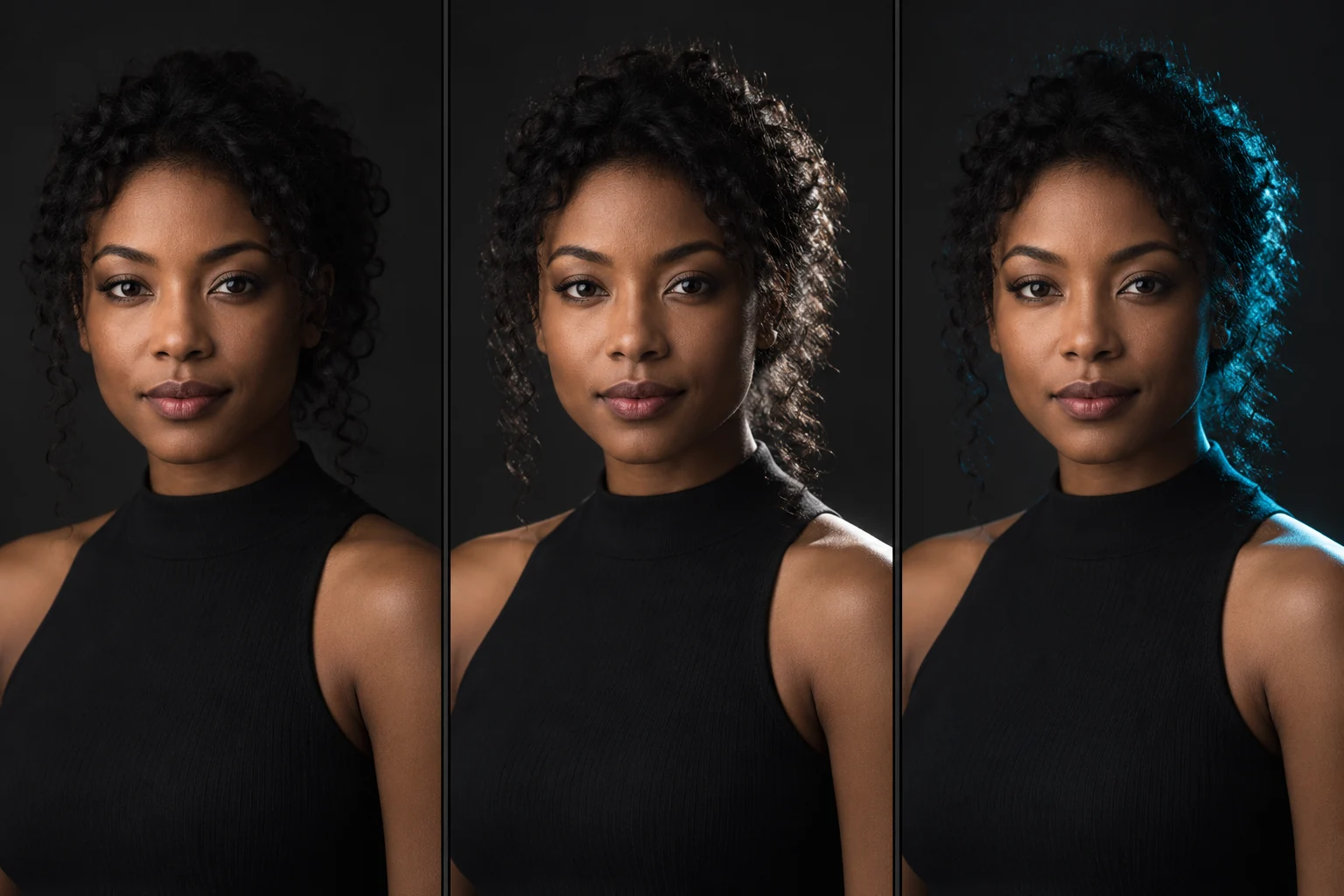
Make a simple contact sheet: key only; key plus a subtle neutral rim; key plus a stronger neutral rim; key plus a gelled rim. Keep the subject, pose, camera and key fixed. For the two neutral rims, record the actual output change. After adding the gel, make a fresh exposure and color check rather than assuming the neutral reading still applies.
Include a rim-only frame and an overhead setup sketch with your final image. Label camera settings, flash model, modifier, approximate distance, power and meter method. If you did not meter, say so. This makes the comparison useful to other photographers instead of presenting a power fraction they cannot reproduce.
Before packing up, check: intended edge, clean nose or intentional profile, controlled flare, retained texture, stable color, and coverage across the pose sequence. Save one unedited reference frame alongside the finished image. Explain what changed in retouching.
Use the sharing controls at the top of this guide to copy the article link or a ready-to-edit group caption. Print the guide if you want the f/8 chart at your set. For feedback on an actual setup, share your own photographs and notes through the site’s How I Lit It submission page.
24. Quick answers to the remaining common questions
Should the rim be opposite the key? Often that gives useful balance, but it is not required. Place it where the subject needs separation. The key side, pose and background all influence that choice. A single rear source can also produce more than one visible highlight on a curved subject.
Can a reflector make a rim? Yes, if it redirects enough light from a useful rear-side angle. It is less independent than a powered source. A window behind and to the side can also work. In either case, check the face, background and exposure together.
Is a rim-to-key ratio of 2:1 always right? No. First define whether you mean isolated source readings, arriving illumination, or recorded image brightness. Those are different comparisons. The best setting is the one that gives the desired edge on this subject with this setup.
Should every highlight stay below clipping? Preserve the detail that matters for the image and output. A few tiny specular points may clip without harming the picture. A broad, textureless band on skin or clothing is often distracting. Evaluate the RAW file and the intended final rendering, not just a single global histogram.
What is the fastest reliable fix? Decide whether the problem is shape, brightness, color or flare. Change placement or coverage for shape, source output for level, filtering and spill for color, and the source-to-lens path for flare. Then make another photograph. That habit is more valuable than memorizing one rim-light setting.
Remember this
Place the edge first. Meter with a stated method. Set brightness for the actual subject, then check texture, color and flare in the photograph. Save the setup so your next rim light starts with evidence.
Turn the guide into a setup you can repeat.
Record your key and rim positions, add measured readings, and keep the final settings together in the existing Studio Lighting Diagram & Power Planner.
Plan and save my rim-light setup →Sources & further reading
Source guidance checked on October 21, 2026. Placement diagrams, stop examples and practice exercises are original teaching material. The portrait comparison is AI-generated illustration, not a studio test. Starting power brackets are suggestions to test, not manufacturer standards.
- Sekonic L-358 manual: incident exposure and source-comparison methods, printed pages 9 and 23–24 ↗
- Westcott University: edge placement and the nose/front-face check ↗
- broncolor: rim lighting with softboxes and deliberately introduced flare ↗
- Elinchrom: controlling portrait lighting with grids ↗
- Rosco: white balance, gels and contrasting colors ↗
Published by DNA Premium Portraits with AI assistance. This lesson is educational; a suggested setting is not a tested result for your exact setup.
Share the setup. Compare the edge.
Pass along the guide, then compare your light placement and results.